
Tool · robots.txt and AI bots
Can AI bots read your site?
robots.txt tells bots what they may do. Check whether it says what you think it says.
Enter a domain or paste your robots.txt. You will see what your file lets 57 bots and tokens from my list do: from GPTBot and ClaudeBot to the new __usage_ai-training token, with Googlebot and Bingbot for comparison. Plus meta robots, X-Robots-Tag, TDMRep, Content-Signal and llms.txt, and for every bot the line that decided it.
The tool at a glance
from my bot list: training, AI search, visits on a user’s request and tokens without a bot of their own. Googlebot and Bingbot for comparison.
logic and tests from Google’s open-source robotstxt library: the longest rule wins, and Allow wins a tie.
robots.txt, the __usage_ai-training token, meta robots and X-Robots-Tag, TDMRep and Content-Signal. Plus llms.txt.
the server fetches the files, your browser computes the result. I store no domains or files.
How it works
What the tool checks and how it decides
When you enter a domain, the podrez.pl server fetches four public files: /robots.txt, the home page (headers and <head> only), /llms.txt and /.well-known/tdmrep.json. Your browser does the rest. You can also paste your robots.txt, and then the file never leaves your computer.
I read the file the way Google does: following RFC 9309 and the open-source robotstxt library, whose tests I ported as well. A bot looks for the group with its name. If there is none, it takes the * group. When several rules match an address, the longest one wins, and Allow wins a tie. Groups with the same name are merged, and Google only reads the first 500 KiB of the file.
Some bots have a fallback rule. Without a group of their own, Google-CloudVertexBot and Googlebot-News follow the rules for Googlebot. The shared __usage_ai-training token does not decide access. It only signals an opt-out of training. Anthropic has taken it into account since October 30, 2026 (rolling out gradually) when the file has no ClaudeBot group, so for ClaudeBot I show it separately, under the result. __usage_ai-training itself is not covered by the * group: without its own group, the site expresses no preference.
For every bot you see the line that decided, and in the tester you can check any address and any user-agent. That is the feature Google removed from Search Console in December 2023. Only the robots.txt report and URL Inspection remain, and URL Inspection works for Googlebot only.
Result
What the statuses mean
Can read
Your robots.txt lets the bot fetch the checked address. Exceptions shared by all bots, e.g. /wp-admin/, are shown as a note under the bot. For tokens: “No opt-out”.
Partly
Rules just for this bot close some addresses to it or open only part of the site. The list is under the bot. For tokens: “Partial opt-out”.
Blocked
Your robots.txt asks the bot not to fetch this address and no rule reopens it. For tokens: “Opted out”. When robots.txt returns a server error (5xx or 429), you will see “Blocked (server error)”.
No preference
Only __usage_ai-training: there is no group for it and the * group does not cover it, so the site says neither yes nor no.
Not applicable
The operator gives no robots.txt name for this bot (e.g. ChatGPT-User). The file will not stop it; only your server can.
The statuses show what your robots.txt asks for, not what a bot will actually do. A server firewall or Cloudflare settings can turn away bots that the file lets in. You will see “Can read” here while the bot gets a 403 or 429. Your logs will show it.
Enter a domain and I check the home page. Enter the full address of a page and I check that page. You can also enter another address in the tester below and recalculate the whole table for it.
AI signals
Allow and Disallow are not everything
__usage_ai-training. A shared token against AI training, announced on October 30, 2026 by Google, Microsoft, OpenAI and Anthropic. I explain who applies it and since when in my post on __usage_ai-training.- Google-Extended. Consent to Gemini training and grounding, i.e. Gemini answers based on your pages, in Gemini apps and Vertex AI. Blocking it does not remove the site from AI Overviews or AI Mode. The Search Console setting does that (Settings → Search generative AI, since August 31, 2026). At page level, you can limit it with
nosnippet,max-snippetornoindex. - Bing. From February 1, 2027, Microsoft reads training (
ai-training) and grounding (ai-grounding) separately in a meta tag or the X-Robots-Tag header. Until March 1, 2027 it also readsnoarchiveandnocacheas an opt-out of both. The tool shows both settings. - TDMRep. A text and data mining reservation under Article 4 of EU Directive 2019/790: a
tdmrep.jsonfile, a header or a meta tag. It is a W3C Community Group report, not a W3C standard. - Content-Signal and Content-Usage. Declarations in robots.txt: the first from Cloudflare, the second from an IETF draft. I show which group they belong to, because a blank line does not close a group and a line can end up applying to a different bot than the author meant.
- llms.txt. I check whether it exists, its status, title and links, similar to the experimental Lighthouse “Agentic Browsing” audit. Google Search does not use it. More in my post on llms.txt.
Before you draw conclusions
robots.txt is a request, not a lock
Honest bots follow it. Spoofed and malicious ones do not. According to their operators, some bots acting on a user’s request (e.g. ChatGPT-User or Perplexity-User) may skip robots.txt, and Google’s feed fetchers ignore it entirely. The tool shows what each operator states.
Your server logs show what bots actually do on your site. I have a separate tool for that: AI bots in logs.
Privacy
What happens to the domain you enter
The files are fetched by the podrez.pl server, so the checked site does not see your IP address, only my server and the tool’s name in the user-agent. The server connects only to public addresses and follows at most five redirects. It stores no domains and no file content. For rate limits it keeps hashes (HMAC) of your IP address, network and the checked domain for at most a day, never the values themselves.
A pasted robots.txt stays in your browser. Its content never leaves it.
What I measure. Google Analytics only learns that someone used the tool: in which mode (domain, pasted file, example), the type of robots.txt response (e.g. “2xx” or “5xx”), the error code if something failed, and whether the tester checked a listed bot or a typed one and came out “allowed” or “disallowed”. No domain, address or user-agent, and only in line with your cookie settings.
Before you change anything
What to do with the result
- No training, but you want to stay in AI search. Block the bots in the “Model training” group (GPTBot, ClaudeBot, CCBot, meta-externalagent, Bytespider and others), the Google-Extended and Applebot-Extended tokens, and add a
__usage_ai-traininggroup. Leave AI search bots (OAI-SearchBot, Claude-SearchBot, PerplexityBot) open. What models already know is marked by their knowledge cutoff (see my AI knowledge cutoff dates table). - You want out of AI Overviews. Google-Extended will not do it. The simplest way is the Search generative AI setting in Search Console (Settings). It excludes the site from AI Overviews, AI Mode and AI features in Discover, with no effect on regular results. For single pages you can use
nosnippetormax-snippet, but that also shortens their description in regular results. - Everything is blocked when it shouldn’t be. Look for
Disallow: /in the*group. It is a common leftover from a staging site. - robots.txt returns a 5xx error. For the first 12 hours Google stops crawling the site, then for up to 30 days it uses the last good copy of the file. Fix the server before you fine-tune the rules.
- “Can read”, but the bot is missing from your logs or gets a 403 or 429. That is your server, not robots.txt. Ask your host about the firewall (WAF) or check the bot settings in Cloudflare. My own host once quietly switched on a firewall that turned AI bots away with a 429. robots.txt let them all in, and I only saw it in my logs.
- Notes on the file. Google forgives typos in directive names and a missing colon; other bots may not. Rules before the first User-agent and patterns without a slash are skipped by every bot. Better to fix them.
- On my own site I let all AI bots in and do not add
__usage_ai-training. I care about visibility in AI answers, so this is a deliberate choice, not an oversight.
Tools and lists
More tools and lists
Free, no sign-up. Each one answers one specific question.

Tool
Entity Observatory
See a page’s structured data as a relation map and add the Wikidata record next to it.

Tool
Are you in Google’s Knowledge Graph?
Type a name and see whether Google knows you as an entity and whether that matches Wikidata.
Tool
Is your site in Common Crawl?
See how many of your pages made it into the Common Crawl archive and whether anything blocks CCBot.

Tool
AI bots in logs
Drop in a server log and see which AI bots actually visit and whether your server turns any of them away.
Tool
Who typed these Search Console queries?
Drop your Search Console export and see which queries look like prompts, operators and tool footprints.
Searchable list
List of bots and user agents
A searchable list of bots: who runs them, what they do and how to handle them in robots.txt.



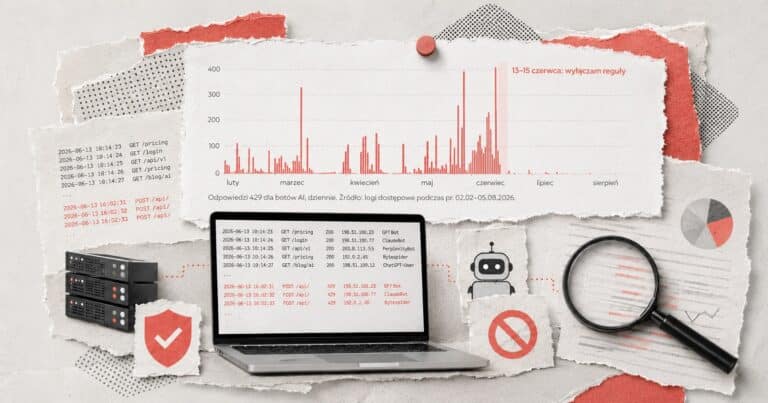


The robots.txt file is a declaration. To see how your server responds to requests posing as GPTBot or ClaudeBot, try High Five, AI! by Maciej Chmurkowski.
Further reading
On AI bots, robots.txt and llms.txt


Frequently asked questions
How do I check whether GPTBot can read my site?
Is this a robots.txt validator?
Is there an alternative to Google’s robots.txt tester?
Can it check my llms.txt?
/llms.txt and shows its status, size, title and summary, plus the number of sections and links. It flags a missing “# title” line, an HTML page instead of the file and a server error, which the experimental Lighthouse “Agentic Browsing” audit counts as a problem. Google Search does not use llms.txt.How do I block AI training but stay in AI search?
User-agent: GPTBot with Disallow: /), add the Google-Extended and Applebot-Extended tokens and a __usage_ai-training group with Disallow: /. Leave AI search bots such as OAI-SearchBot, Claude-SearchBot or PerplexityBot open. After the change, check the file with this tool.Does blocking Google-Extended remove my site from AI Overviews?
nosnippet, max-snippet or noindex.What is __usage_ai-training?
* group does not cover it: unless you add a separate group for it, the site expresses no preference. It is a training opt-out, not a block: whether a bot comes in at all is still decided by the rules for its name or the * group. Details and rollout dates: post on __usage_ai-training.Does robots.txt really stop bots?
Why is ChatGPT-User “Not applicable”?
What does “Partly” mean?
/wp-admin/ or search results in the * group, do not change the status. I show them as a note under the bot.Do I need llms.txt?
How is this different from the robots.txt tester in Search Console?
How often can I check?
Do you store the domains I check?

Data: my bot list (as of November 8, 2026). Parser: ported from Google’s open-source robotstxt library (Apache License 2.0) together with its tests. The tool is not affiliated with Google, Microsoft, OpenAI, Anthropic or Cloudflare.
What next
Not sure which bots to let in?
Training, AI search, user-triggered visits and regular search engines are four separate decisions. I help you make them without losing visibility where you need it.
Want me to take a look?
Send a short brief: your domain and what the tool showed. I’ll tell you what to set up first.
Feedback
Something not working or got an idea?
I build these tools myself and keep improving them, so every note helps. Tell me what happened or what you’re missing. If something broke, add your browser and device (phone or computer) and I’ll find it faster.