

As of November 13, 2026 · data from podrez.pl server logs, February 2 – August 5 and October 7 – November 11, 2026
Crawl budget is the set of URLs that Google can and wants to crawl on your site. That’s Google’s own definition, and it differs from the one in most guides. It’s not “how many pages Google crawls per day,” it’s which URLs Google is able and willing to fetch. It’s about crawling, meaning Googlebot downloading pages. Indexing is a separate, later step, and a crawled page won’t necessarily end up in the index.
If your site has a few hundred pages, crawl budget is almost certainly not your problem. Still, when I went through six months of my own server logs, one in five confirmed Googlebot requests (20.6%) went to URLs that added nothing. Below you’ll find what those URLs were, which of them were worth fixing and how to run the same count on your own logs in a few minutes with my free log file analyzer.
In short
Crawl budget comes from two things: the crawl capacity limit (how much your server can take) and crawl demand (how much Google wants to crawl). Google counts it per hostname.
It mainly matters for large sites and for online stores whose filters multiply URLs.
In my logs, one in five Googlebot requests went to URLs that added nothing, led by WordPress /embed/ versions of posts. Those requests stopped in July, and a robots.txt rule now blocks the /embed/ URLs.
A noindex tag doesn’t save crawl budget (at most indirectly, in the long run); robots.txt is the tool for URLs Googlebot should never fetch.
What is crawl budget?
Google bases crawl budget on two factors that work like two valves on the same pipe.
Two valves on one pipe: the crawl capacity limit and crawl demand. Whichever is turned down further sets the budget.
Crawl capacity limit
How much Googlebot can fetch without overloading your server. Google describes it as a cap on the total time your server spends holding connections open for Google, counting both how many connections run in parallel and how long they last (it’s also called hostload). Every site starts with the same conservative default. When there’s demand to crawl more and the site responds consistently, with stable or improving response times, the limit goes up. When it slows down or responds with 5xx errors or HTTP 429 (“too many requests, slow down”), the limit goes down.
Crawl demand
How much Google wants to crawl in the first place. For Googlebot it depends on the size of the site, how often it changes, page quality and relevance compared with other sites. The factors you can influence most are the URLs Google knows about on your site (Google calls this perceived inventory), their popularity and staleness, meaning how out of date Google’s copy is. Site-wide events such as a site move can raise demand, because Google needs to reprocess the content under the new URLs.
Crawl budget is the result of both.
Even if your server could take more, Google will crawl less when demand is low.
Good to know
Two details from the documentation that are easy to miss. First, Google counts crawl budget per hostname, so www.example.com and shop.example.com have separate budgets. Second, the crawl capacity limit is shared by all Google crawlers. Each one has its own demand (AdsBot wants more when a site runs dynamic ad targets), but high demand from one can reduce what’s left for the others.
You’ll also come across the term crawl rate. Google’s 2017 post used “crawl rate limit” for what is now called the crawl capacity limit. In everyday use, crawl rate simply means how many requests Google’s crawlers send, which is what Search Console shows in Crawl stats. Crawl budget is the broader idea: which URLs get crawled at all.
And the most important part: Google says plainly that not every crawled page will be indexed. After crawling, each page is evaluated, consolidated with its duplicates and assessed for the index.
When does crawl budget matter?
Google’s guide is written mainly for three types of sites:
- 1
Large sites
1 million+ unique pages with content that changes moderately often, about once a week.
- 2
Medium or larger sites
10,000+ unique pages with content that changes very rapidly, every day.
- 3
Many “discovered” URLs
A large share of URLs classified in Search Console as “Discovered - currently not indexed.”
Google adds that these are rough estimates, not exact thresholds. Back in 2017 it wrote that a site with fewer than a few thousand URLs will be crawled efficiently most of the time, and that if new pages tend to be crawled the day they’re published, crawl budget isn’t something to focus on. The current guide keeps the same-day test and adds that, for Google Search, keeping your sitemap up to date and checking the Page indexing report regularly is enough.
For comparison: on November 1, 2026, my sitemaps listed 117 URLs. If it were only about numbers, I could stop here. But in an online store, scale is set by the number of URLs a crawler can find, and that can be many times the number of products. Filters, sorting and parameters can turn a few thousand products into hundreds of thousands of combinations. That’s when Google’s thresholds stop being abstract.
Where are you on the scale? The axis is logarithmic: each tick is ten times more URLs. A store with filters can jump two orders of magnitude.
So for an online store, the goal isn’t for Google to see and index everything but to see what actually matters. Internal links help: links from popular pages to categories and new products tell Googlebot where to come back more often. Filters that deserve their own pages (say, “women’s hiking boots”) should be regular links, not just buttons or sliders. Combinations nobody searches for are best kept away from the crawler altogether. Google has a separate guide to faceted navigation, its name for filters.
What does Googlebot spend crawl budget on? Data from my server logs
Instead of writing about “wasted crawl budget” in the abstract, I counted it on my own site. I took the podrez.pl access logs from February 2 to August 5, 2026 (185 days, over 1.8 million requests, the same logs behind my server log analysis for AI visibility) and pulled out everything that called itself Googlebot.
First surprise? Not every Googlebot is Googlebot. Of 11,102 such requests, 2,154 (19.4%) came from IP addresses outside the ranges Google publishes for its crawlers, including 999 from a single DigitalOcean cloud server in March. I show how to check a bot’s IP address in my list of bots. I set all of those requests aside. That left 8,948 confirmed requests, 48 a day on average.
podrez.pl access logs, February 2 – August 5, 2026 (185 days). I removed requests from outside Google’s IP addresses before any further analysis.
Posts and pages: 3,665 requests to 173 URLs; 122 of those requests got a “304 Not Modified” response. Source: podrez.pl access logs, February 2 – August 5, 2026, Googlebot user agent only (no Googlebot-Image) from Google IP addresses. My own analysis, October 10, 2026.
| No-value URLs | Requests |
|---|---|
| WordPress /embed/ versions of posts (35 URLs: 22 with noindex, 13 redirected) | 517 |
| /ads.txt (I don’t run ads: a redirect from http, then a 404) | 432 |
| A missing CSS file from The Events Calendar plugin (404) | 310 |
| Polish and English home page redirects | 277 |
| Redirects from old URLs (51 URLs) | 215 |
| Old pagination (/page/2/, /page/3/…) | 44 |
| admin-ajax.php | 36 |
| The rest: URLs with UTM parameters and one-off errors | 14 |
1,845 requests in total. Same window and source as above.
Which of these are a problem, and which only look like one in a table?
/embed/ pages: noindex doesn’t save crawl budget
WordPress adds a version of every post meant for embedding on other sites (the URL ends in /embed/). These pages carry noindex (I checked /bluf/embed/ on October 10, 2026, and it still does). Googlebot fetched the 22 that returned 200 a total of 434 times, and another 83 requests went to 13 older /embed/ URLs that now redirect. It came back most often to /geo-vs-seo/embed/ and /encja-kontekst-intencja/embed/, 40 times each. And the Polish version of this article? In the same period, Googlebot fetched it twice and its /embed/ version 16 times.
Important
This is exactly the scenario Google’s documentation warns about. A noindex tag doesn’t protect crawl budget, because Googlebot still has to request the page and only drops it once it sees the tag. If Googlebot shouldn’t fetch something at all, robots.txt is the tool for that. The noindex tag does a different job: it keeps a page out of the index. Google does admit that in the long run noindex can indirectly free up some crawl budget, because once URLs are out of the index, its crawlers can focus on other URLs on your site. Still, Google rates “noindex controls crawl budget” as only partly true: its job is keeping pages out of the index.
The third row of the table is most likely related to /embed/ too. The plugin’s tribe-events-embed.min.css file returned 404 across six versions (from ?ver=6.15.14 to ?ver=6.16.3). The name suggests the plugin added it to the embed view, so when Googlebot rendered /embed/, it asked for a stylesheet that wasn’t there. That’s my hypothesis: the log shows the request, not the page that triggered it.
Starting in July, both effects disappeared from the logs, and the share of no-value URLs fell from 26.7% in February to 9.5% in July. Why? I don’t know for sure, and I won’t guess in an article about measurement. The /embed/ pages still returned 200, and the source code of the Polish version of this article no longer showed any trace of The Events Calendar (checked on October 10, 2026). Even so, since this fall I’ve been blocking them in robots.txt with Disallow: /*/embed/ to keep Googlebot from coming back. You’ll see what my logs show now further down.
ads.txt: looks like waste, but I’m leaving it alone
An ads.txt file declares who may sell ads on a site. I don’t run ads, so I don’t have one. Googlebot asked for it 432 times, 57 to 82 times in each full month: first the http version (a 301 redirect), then the https one (404). Is that waste? The 182 http redirects, technically, yes. In practice, at 48 requests a day and around 120 URLs in my sitemaps, it costs me nothing, and a 404 is the correct response for a file that doesn’t exist. Google’s myths and facts about crawling go even further: pages that return 4xx codes (except 429) don’t waste crawl budget, because Google tried and got a status code with no content. Not everything that looks like waste in your logs needs fixing.
Redirects: Google doesn’t forget old URLs
In all, 215 requests went to 51 old URLs I now redirect, for example /materialy-edukacyjne/google-moja-firma/ (31 times), left over from moving my guides in fall 2025. Google says it won’t forget a URL it knows about. A single 301 is the normal cost of a move. Chains are worse, and I have a small one myself: https://www.podrez.pl/ first goes to https://www.podrez.pl/ and only then to https://podrez.pl/ (still the case on November 12, 2026). Two hops instead of one. At my scale, it’s a minor detail. In a store where that chain repeats across hundreds of thousands of URLs, it isn’t.
The 277 home page redirects are mostly old http and www variants. I say “mostly” because my logs don’t record the hostname, so I can’t say exactly how many are which.
Rendering resources are a cost, not waste
Almost a third of all requests were for files needed to render pages. Google says that, in general, any URL Googlebot crawls counts toward crawl budget, including CSS, JavaScript and XHR requests (data that scripts fetch after the page loads), and that time spent rendering a page counts as much as time spent requesting it. I don’t block these files, because without them Googlebot can’t see a page the way a reader does. What I can do is keep their number down and make sure the server delivers them fast.
How to check your crawl budget
No tool shows a single number called “crawl budget.” You piece it together from three sources:
- 1Search Console: Settings → Crawl stats
Here you’ll see how many requests Google’s crawlers send per day (Googlebot, but also AdsBot, Googlebot-Image and others) and how fast your server responds. Below are breakdowns by response code, file type, purpose (discovering new URLs or refreshing known ones) and Googlebot type. A sudden drop in requests while response times climb is your first clue.
- 2Page indexing report
How many URLs are marked “Discovered - currently not indexed.” If a large share of your URLs sits there, your site is in the third group Google’s guide is written for.
- 3Server logs
Filter for the Googlebot user agent, check each IP address against Google’s published lists and group requests by URL type and response code. Then ask one question: how much of this goes to URLs I want in Google? Search Console shows samples and totals. Logs show every request, including the ones that only borrow Googlebot’s name. You can count it all in my free log file analyzer, in the “Googlebot in your log” section. The file stays on your computer.
Running the same log through a free log file analyzer
The numbers above took me a few Python scripts to produce in October. As of November 12, 2026, the same method is built into my free tool, AI Bots in Logs, in the “Googlebot in your log” section. To check that it adds up, I ran it on the same 185-day log: 1,822,819 lines, 437 MB.
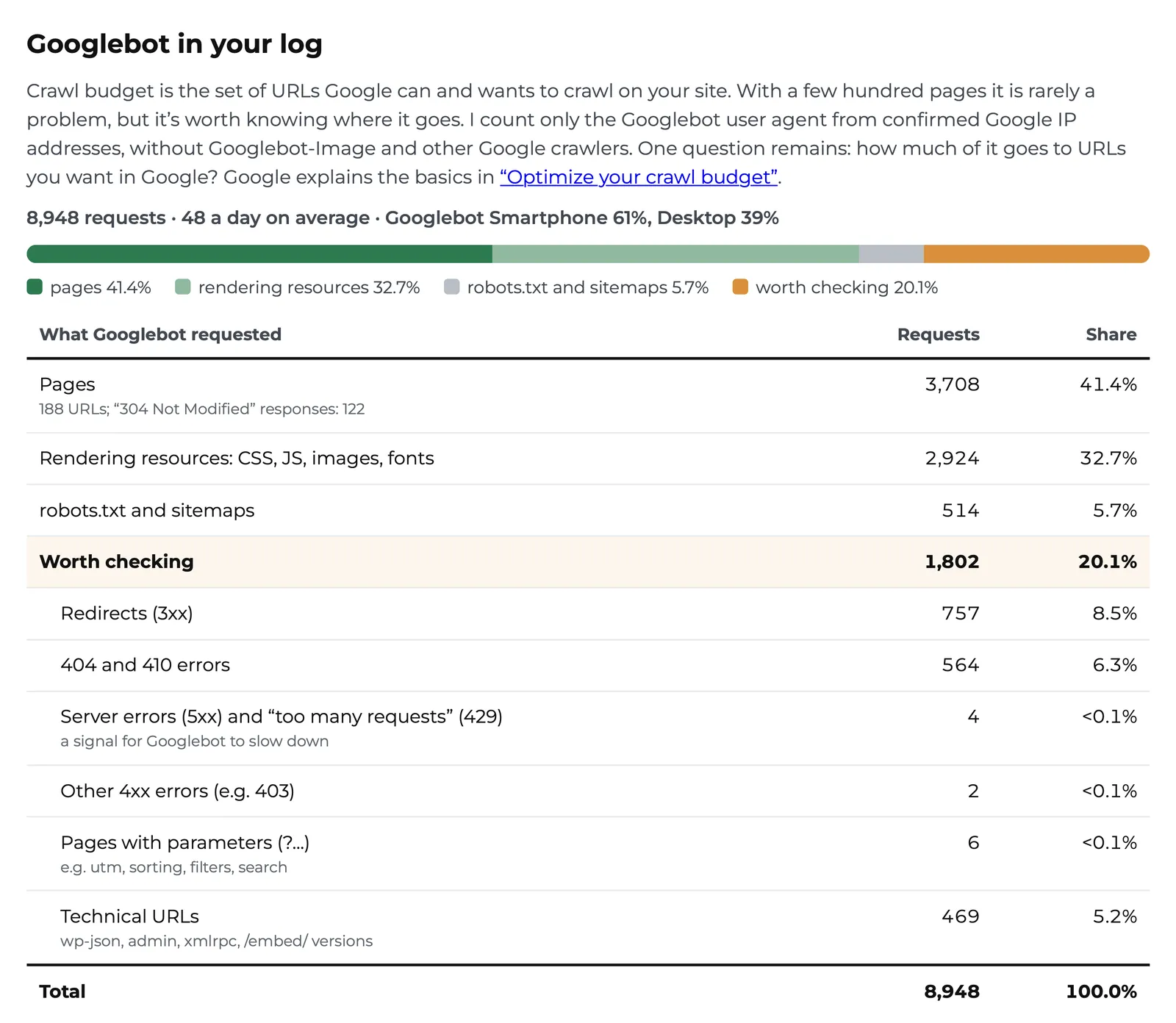
The tool reproduced my numbers to the request: 11,102 requests claiming to be Googlebot, 2,154 of them from unconfirmed IP addresses, 8,948 confirmed. Its “Worth checking” group came to 1,802 requests (20.1%), compared with my manual count of 1,845 (20.6%). The 43-request difference comes down to grouping. I counted 44 requests to old pagination (/page/2/, /page/3/…) as no-value URLs, while the tool counts a page that returns 200 as a page. It also flags one request to /wp-json/ that I had left among the pages. That’s why its Pages row shows 188 URLs instead of my 173: 16 pagination URLs in, /wp-json/ out.
What the tool shows on top of my table:
URLs worth checking, by type
Redirects (757), 404 and 410 errors (564), technical URLs such as /embed/ and admin-ajax.php (469), server errors (4), other 4xx errors (2) and parameter URLs (6), each with a list of URLs and a short tip. That’s how I noticed four HTTP 500 responses for sitemap_index.xml, which my table had tucked away under “the rest.”
Site sections
Requests by top-level directory, with the share that’s worth checking. On my site, all 93 requests to /materialy-edukacyjne/ were redirects: the guides I moved in 2025.
Sitemap vs Googlebot
Drop your sitemap files together with the log and you’ll see which sitemap URLs Googlebot didn’t fetch, which ones return a redirect or an error, and which pages it fetches even though they aren’t in the sitemap.
Every URL in a CSV file
“Download Googlebot URLs (CSV)” gives you each URL with its requests, response codes, last request and sitemap status. Handy when the fix is your developers’ job.
How to run it: download a raw access log from your hosting panel (.log, .gz or .tar.gz; Apache, Nginx or LiteSpeed, in combined log format). Not sure where it is? The tool page has a short guide. Drop the log onto the tool’s page. If you want the sitemap comparison, drop all your sitemap files together with the log, in one go. Then scroll to “Googlebot in your log.” The analysis runs in your browser and the file isn’t uploaded anywhere.
Limits worth knowing
A server log only sees what reaches your server. If a CDN (for example Cloudflare) serves part of the traffic, Crawl stats in Search Console and your logs won’t match exactly. Crawl stats also counts all Google crawlers (AdsBot, Googlebot-Image and others), while “Googlebot in your log” counts Googlebot only. The default combined log format doesn’t record the hostname, so www and non-www URLs are counted together. And the tool counts a request as Googlebot only when its IP address is on the lists Google publishes.
How to optimize crawl budget: what Google recommends
Here are the recommendations from Google’s crawl budget guide (as updated on July 22, 2026), with my comments where my own site has something to show.
- 1
One piece of content, one URL
Consolidate duplicate content so Google crawls unique content rather than unique URLs. Google’s guide to consolidating duplicate URLs explains how (canonical, 301). In a store, that mostly means sorting and filters.
- 2
robots.txt for URLs Googlebot should never fetch
Internal search results, the cart, filter combinations nobody searches for. Not noindex (see /embed/ above). And not a temporary robots.txt block: Google warns that it won’t shift the freed-up crawl budget to other pages unless your site is already hitting its crawl capacity limit. I read that sentence twice. My robots.txt checker shows which bots a rule affects, Googlebot included.
- 3
404 or 410 for pages removed for good
A blocked URL stays in the crawl queue much longer and gets recrawled when the block is removed, while a 404 is a strong signal not to crawl it again. Watch out for soft 404s too: pages that say “nothing here” but return 200. Google keeps crawling them.
- 4
Up-to-date sitemaps
Include the lastmod tag for updated content.
- 5
No long redirect chains
Internal links should point straight to the final URL.
- 6
A fast server and 304 responses
If a page hasn’t changed since the last visit, the server can respond with “304 Not Modified” instead of sending the page again. In my logs, that happened 122 times out of 3,665 page requests. Google supports two mechanisms: ETag (Googlebot checks it with If-None-Match) and Last-Modified (checked with If-Modified-Since). It strongly recommends ETag, because it’s less prone to errors than a Last-Modified date, and suggests setting both if you can. Just make sure a changed page never returns 304, or Google will stick with the old version.
- 7
No 5xx or 429 for Googlebot
To Googlebot that’s a signal to slow down. When I analyzed my logs for AI bots, it turned out my hosting provider had sent AI bots a 429 thousands of times. To Googlebot, not once. Thank goodness.
robots.txt, noindex, canonical or 404?
These are easy to mix up, and each one does something different:
| Situation | What to do | Watch out for |
|---|---|---|
| The URL should never be crawled | a rule in robots.txt and no internal links to those URLs | A robots.txt block doesn’t remove a URL from the index. If Google finds it through links, it can stay in search results without its content. |
| The page should be available, but not indexed | noindex, without a robots.txt block | Google has to crawl the page to see noindex. On a page blocked in robots.txt, it never will. |
| Several URLs with the same content | canonical and consistent internal links, a 301 redirect if needed | Canonical is a signal, not a directive. It doesn’t stop duplicates from being crawled. |
| A page removed for good, with no replacement | a 404 or 410 status code | Don’t redirect everything to the home page. Google may treat that as a soft 404. |
Your robots.txt controls crawling, noindex controls indexing and canonical points to the preferred version. Combining them on one URL can cancel them out: with a robots.txt block plus noindex, Google never sees the noindex, and the URL can still show up in search results.
Fun fact
There’s no handbrake in Search Console anymore. The crawl rate limiter tool was retired on January 8, 2024, and Googlebot adjusts its pace to how your server responds. If you urgently need it to slow down, Google suggests returning 500, 503 or 429 for a short time, a couple of hours or a day or two. Keep it up much longer and those URLs may drop out of the index. Google doesn’t process the crawl-delay rule in robots.txt either.
Page speed and crawl budget (and where Core Web Vitals fit in)
Core Web Vitals are three metrics: LCP (loading), INP (responsiveness, which replaced FID in March 2024) and CLS (visual stability). TBT, or Total Blocking Time, is a lab metric from Lighthouse. According to web.dev it’s only a proxy for INP, because in a simulation there’s no user to click anything.
For crawl budget the distinction matters. Core Web Vitals measure what people experience in a browser, while Googlebot has other worries: server response time, the number of files to fetch and how long rendering takes. Google says that if it can load and render your pages faster, it might be able to read more content from your site. My take? Good Core Web Vitals and a fast server go together more often than not, but a PageSpeed Insights score won’t tell you how many pages Googlebot fetches a day. Search Console and your logs will.
| What it measures | Data source | What it says about crawl budget | |
|---|---|---|---|
| Core Web Vitals (LCP, INP, CLS) | what people experience in the browser: loading, responsiveness, stability | CrUX, real visits in Chrome | little, at least directly |
| TBT | main thread blocking in a simulation | Lighthouse, a lab test | nothing directly; it’s a proxy for INP |
| Server response time | how fast the server delivers a document to Googlebot | Crawl stats in Search Console; server logs only if your log format records response time | the most: it affects the crawl capacity limit |
Of these three, what matters most for Googlebot is how fast your server responds. Core Web Vitals and TBT describe what people experience.
What to measure after you make changes
New robots.txt rules or a filter cleanup are easy to deploy but harder to evaluate. Before you block anything, write down what you want to achieve and which URLs you’ll use to check it.
- 1
A specific goal
Not “fewer Googlebot visits” but, for example, less time from publishing to the first crawl, faster refreshes of updated products or fewer 5xx responses. An overall drop in visits may mean Googlebot is also returning less often to the pages it should be revisiting.
- 2
A group of important URLs
Pick the URLs that matter: new posts, categories, bestsellers. Look at them separately, because a site-wide average will blur the effect.
- 3
Logs and Search Console together
Crawl stats shows totals and a sample of URLs; logs show every request. If a CDN handles part of the traffic, your server logs may not see it. And Crawl stats covers all Google crawlers, not only Googlebot. So the numbers from both sources won’t necessarily match exactly.
- 4
What else changed
When you compare periods, note new content, deployments and outages. Look at absolute numbers and at shares: the share of unwanted URLs can drop just because Googlebot started fetching other pages more often.
Here’s my own check, with one caveat. Requests to /embed/ had already stopped in July, before I added the Disallow: /*/embed/ rule, so this isn’t a clean before-and-after test of the rule. I ran the same tool on my daily logs from October 7 to November 11, 2026 (35 files, one day missing). The rule was in my robots.txt by October 8 at the latest, and /embed/ shows zero requests across the whole window.
podrez.pl access logs, October 7 – November 11, 2026, counted with my AI Bots in Logs tool (version 1.4.0) on November 12, 2026.
Requests to /embed/ stayed at zero. Yet the share of URLs worth checking is 20.0%, practically the same as the tool’s 20.1% for February–August. Why? Because Googlebot keeps running into redirects: 335 in five weeks. Most of them (181) come from pages I moved or merged, some in 2025 and many this fall. The rest are the http and www variants of the home page (66), old pagination such as /page/3/ and /page/16/ (52) and the http version of ads.txt (36). One problem gone, another one created by my own cleanup. That’s exactly why it pays to look at absolute numbers alongside shares and to note what you changed and when.
On a large site, log analysis quickly goes beyond SEO and lands on the IT team’s desk, so it rarely ends with a single report from a tool. I do it as part of SEO audits, on several months of logs rather than a single day. If that’s what you need, send me a short brief.
Crawl budget: frequently asked questions
Does crawl budget affect rankings?
Not directly. Google says crawling is necessary for a page to appear in search results, but it isn’t a ranking signal, and a higher crawl rate won’t necessarily lead to better rankings. Indirectly, yes, if a new or updated page waits weeks for Googlebot.
Does noindex save crawl budget?
Not right away, and that isn’t its job. Google has to crawl a page to see noindex, so every such request counts toward crawl budget. Google admits that in the long run noindex can indirectly free up some budget, because once pages are out of the index, Google’s crawlers can focus on other URLs. If a URL shouldn’t be crawled, block it in robots.txt, and remember that a blocked page can stay in the index without its content if Google finds it through links.
Do I need to worry about crawl budget on a small site?
Usually not. With a few hundred URLs, one-off mistakes (a redirect loop, an accidental noindex, a server that goes down at peak hours) are more likely to hurt you than crawl budget. In my six-month window, Googlebot fetched the Polish version of this article twice, and from July to early October 2026 the article still held an average position of 9 for “crawl budget” in Search Console (searches in Poland).
How do I check my crawl budget?
In Search Console, open Settings → Crawl stats for requests per day and response times, and the Page indexing report for URLs marked “Discovered - currently not indexed.” For details, go to your server logs: keep only Googlebot requests from confirmed Google IP addresses and see how many of them hit URLs you want in Google. My free log file analyzer does that in your browser.
What is the difference between crawl budget and crawl rate?
Crawl rate is how many requests Google’s crawlers send to your site, the number you see in Crawl stats. Crawl budget is the set of URLs Google can and wants to crawl, shaped by your server’s capacity and Google’s demand. There’s no crawl rate setting anymore: Google retired the crawl rate limiter tool in Search Console on January 8, 2024. You can slow Googlebot down through server responses (500, 503 or 429), and only for a short time.
Do AI bots use up Googlebot’s crawl budget?
Crawl budget, as Google’s documentation describes it, applies to Google’s crawlers, and they’re the ones sharing the crawl capacity limit. Bots from OpenAI, Anthropic or Perplexity aren’t part of that calculation. They can get in the way indirectly: if their traffic slows your server down or triggers rules that also send 429 to Googlebot, the limit can drop. That’s my hypothesis based on how Google describes the limit. In my logs Googlebot never got a 429.
How can I get more crawl budget?
Google names two ways. Add server resources if your site can’t be crawled because of server capacity (for example, when the URL Inspection tool reports “Hostload exceeded”). And improve the quality of your content for the Google product you’re targeting: for Search that includes popularity, overall user value, content uniqueness and serving capacity.
Sources
Google, Optimize your crawl budget, Crawling infrastructure documentation, last updated July 22, 2026.
Google, Myths and facts about crawling (noindex, 4xx responses, alternate URLs and embedded content, crawl-delay), last updated December 18, 2025.
Google, Managing crawling of faceted navigation URLs.
Google Search Central Blog, What Crawl Budget Means for Googlebot, Gary Illyes, January 16, 2017.
Google Search Central Blog, Upcoming deprecation of Crawl Rate Limiter Tool in Search Console, November 24, 2023.
Google, Reduce the Google crawl rate, last updated October 6, 2026.
Google Search Central Blog, Crawling December: HTTP caching, Gary Illyes, December 9, 2024 (ETag and Last-Modified).
Search Console Help, Crawl Stats report and Page indexing report.
web.dev, Web Vitals: the definition of Core Web Vitals and TBT as a lab proxy for INP.
podrez.pl access logs, February 2 – August 5, 2026: 11,102 requests with the Googlebot user agent, 8,948 of them from confirmed Google IP addresses. My own analysis, October 10, 2026, recounted with my AI Bots in Logs tool (version 1.4.0) on November 12, 2026, and checked again with version 1.4.1 on November 13, 2026.
podrez.pl access logs, October 7 – November 11, 2026 (35 daily files): 1,939 confirmed Googlebot requests, counted with my AI Bots in Logs tool (version 1.4.0) on November 12, 2026.
