

First published in Polish: July 3, 2026 · English version: November 14, 2026
The Generative AI report in Google Search Console has been available to all sites worldwide since August 31, 2026. Google announced it on June 3, 2026, initially rolled it out to a subset of websites, and then gradually made it available to more.
In short
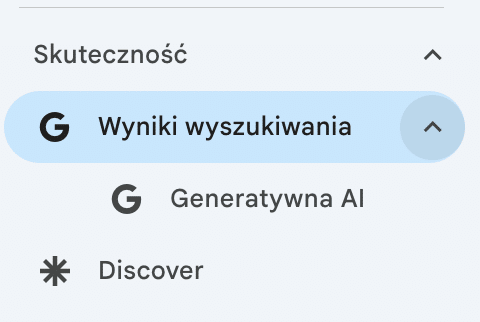
Where: Performance → Search results → Generative AI. If it’s not in the menu, add /ai to the end of the Performance report URL.
What it counts: only impressions of your URLs in AI Overviews and AI Mode, broken down by page, country, device, date and search type.
What it doesn’t show: clicks, queries, fan-out or citations. Clicks from AI answers sit in the regular Performance report, together with the rest of Search.
The setting: in Settings you can exclude your site, or part of it, from generative features. By default your site is included, and according to Google the setting doesn’t change classic results.
In June, the report first showed up on my .co.uk and .com domains, and even then not on every property. If you don’t see any data in it today, that doesn’t necessarily mean your site isn’t in AI Overviews. Google gives two reasons: your site has too few impressions in generative features, or it’s excluded from them in the settings. If in doubt, an AI Overviews citability audit will tell you more than an empty report.
What is the Generative AI report in Search Console?
The Generative AI report shows how often URLs from your site appear in Google’s generative search features – in AI Overviews (generative summaries above the classic results) and in AI Mode (Google’s conversational search mode) – separately from classic organic results. You’ll find it under Performance → Search results → Generative AI.
The Performance section itself also points you to the new report:
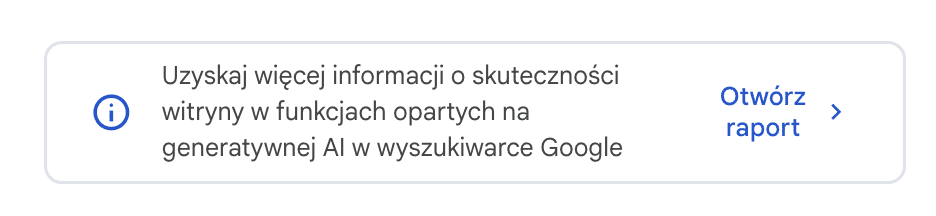
Discover has its own Generative AI report too. A word of warning here, because it’s easy to get the wrong idea: I don’t mean the Discover report itself, which many of us have had for years, but a new item next to it, with impressions in AI features inside Discover. Google is rolling it out gradually and only to sites with enough of those impressions, and it counts the data by page, not by property. I can’t see it on any of my accounts yet, and for now that’s the norm, not the exception.
Until now, impressions from AI Overviews and AI Mode landed in the same bucket as the rest of organic traffic in the Performance section, and there was no way to isolate them. The SEO industry and publishers had been waiting for better analytics and a clear split since the day AI Overviews launched. Google has finally delivered it, in a version that is, to put it mildly… spartan.
What data does the Generative AI report show?
The report shows impressions only. You can break them down by page, country, device and date (days, weeks or months), and since September 24, 2026, you can also filter by search type: “Web: text-based” covers regular queries, and “Web: multimodal” covers searching with images, e.g., via Google Lens, Circle to Search or Chrome image search. On my accounts, the chart starts on May 18, 2026. And that’s pretty much… it.
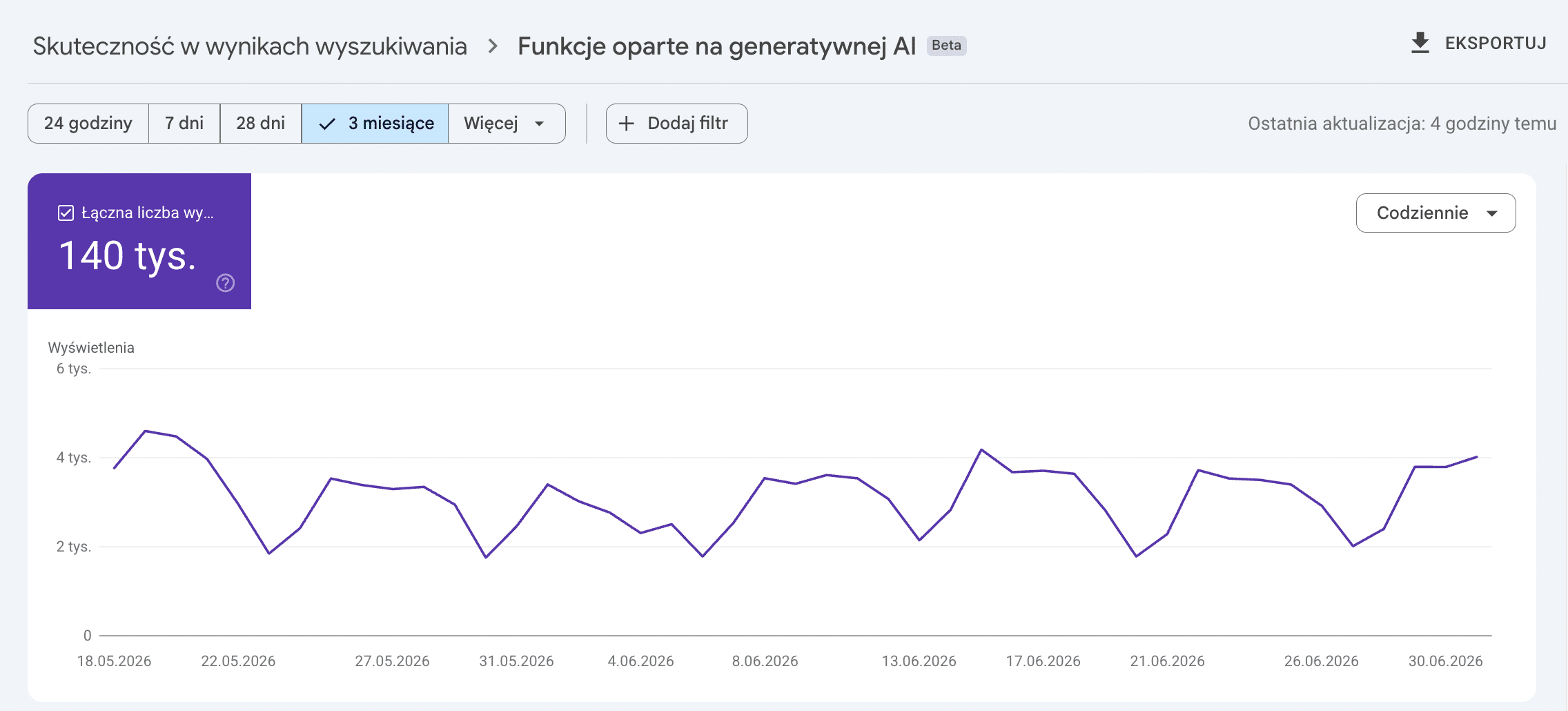
How Google counts impressions
In AI Overviews and AI Mode, the standard impression rules apply. A link in a carousel or a collapsed section usually only counts once it’s scrolled into view or expanded. Your URL merely sitting somewhere in the background of a generated answer isn’t enough.
On the chart, Google aggregates data by property: two of your URLs in a single AI answer count as one impression (Generative AI report help page). I explain where odd impressions in Search Console come from in 6.9 million impressions, one click: what was GSC actually counting?
In the report, you won’t find clicks, queries or query fan-out data. You won’t learn which prompts make your page show up in an AI answer, or whether anyone clicked through to you from that answer. For now, the report really answers one question: which of your pages are popular in Google’s generative features – and you can’t infer much more than that from it.
| Data | In the report? | Where to look instead |
|---|---|---|
| Impressions | Yes, by page, country, device and date | This is the only place in Google where AI impressions are separated from the rest of Search |
| Search type | Yes, the “Web: text-based” and “Web: multimodal” filter | – |
| Clicks | No | Performance (together with the rest of Search) and analytics as organic traffic, with no AI split |
| Queries and prompts | No | Performance: some AI Mode queries, which you can spot with my Search Console prompts tool |
| Fan-out | No | Nowhere in Google. The closest thing is grounding queries in AI Performance in Bing |
| Citations and competitors | No | Manual checks or monitoring on your own prompt list (AI visibility research) |
| Discover | A separate report, once the site has enough impressions | – |
As of November 14, 2026, based on Search Console Help.
Some AI Mode queries do, however, end up in the regular Performance report, together with all your other searches. You can check which of them look like prompts and which look like footprints of monitoring tools with my tool Who typed these Search Console queries?
You can’t separate clicks from AI answers in analytics either. On November 12, 2026, Google described how to identify Search traffic by the Referer header, but the document doesn’t mention AI Overviews or AI Mode. The Referer only gives you a Google address, e.g., https://www.google.com/. I describe what else you’ll see in your logs in my post on server log analysis and AI visibility.
Where AI shows up in Google data. The Generative AI report (highlighted) is the only place that separates AI answers from the rest of Search, but it counts impressions only. As of November 14, 2026.
The Search generative AI setting
Quick access
If you can’t see the report in the menu, add /ai to the end of the Performance report URL in Search Console.
While you’re at it, take a look at your settings. Google has added a “Search generative AI” section there, which lets you exclude your site from AI Overviews, AI Mode and generative AI features in Discover. Like the report, it has been available to all sites since August 31, 2026. Since July 10, 2026, it’s also one of the conditions in Google’s guide to generative AI search: an excluded site won’t make it into AI answers. There are three options:
Include
“Include my site’s links and content…” is the default option. Your site’s links and content can appear in generative AI features.
Exclude
Content usually disappears from generative AI features within 1–2 days of the change going live, and the change itself takes effect after a few days. Impressions and traffic from AI drop to zero.
Inherit control from parent
The default for a child property, e.g., /blog/ added as a URL-prefix property. You can change it and set something different for that part of the site.
Before you switch anything: according to Google, the setting doesn’t affect rankings in classic results. Excluded content may still help Search as a whole, e.g., in understanding the language of queries. The switch doesn’t cover model training either. For training, Google, Microsoft, OpenAI and Anthropic have announced a shared robots.txt rule, which I cover in What does __usage_ai-training change?
Before you exclude
Excluding cuts off all impressions and traffic from AI features, so first check in the report how many of them a given part of your site gets.
If the problem is limited to one section, add it as a separate URL-prefix property and exclude only that. The owner of the Domain property will get a notification that someone has overridden their setting.
For comparison: Bing’s tool shows more, and it’s more interesting – including grounding queries and actual citations, though only within the Microsoft ecosystem. You can read about it here: Grounding queries in Bing Webmaster Tools, and about the topics Copilot cites you for in my Topics Portfolio test.
| What I compare | Generative AI (Google) | AI Performance (Bing) |
|---|---|---|
| Where it counts | AI Overviews and AI Mode | Copilot, AI summaries in Bing and select partner integrations |
| Metric | Impressions | Citations and Citation Share |
| Queries | None | A sample of grounding queries |
| Pages | Yes | Yes, cited pages |
| Clicks | None | None |
| Topics and intents | None | Intents, Topics and Topics Portfolio (beta) |
| Status | All sites since August 31, 2026 | Preview since February 10, 2026 |
As of November 14, 2026, based on Search Console Help and the Bing blogs.
The paradox is that today a search engine most people never open tells you more about AI visibility than the one with close to 90% of the market.
That’s why I never read either of these reports on its own. GSC impressions tell you that Google reached for your content; Bing WMT adds the queries where that happens. No search engine will give you the rest – you have to measure it yourself on your own prompt list, manually or with an AI monitoring tool. That’s exactly what an AI visibility audit is for.
Why does the AI report in Search Console have to evolve? Google has no choice…
The announcement date is no coincidence. On the very same day, June 3, 2026, the UK Competition and Markets Authority (CMA) imposed a publisher conduct requirement on Google – a binding package of obligations toward publishers that follows from Google’s designation as a firm with strategic market status in general search.
Among other things, the package requires Google to give publishers effective controls over how their content is used in its generative AI, as well as “clear and detailed metrics on user engagement with their search content in search generative AI features.”
And this is where it gets interesting, because the CMA spells out the metrics: impressions, clicks and CTR in generative features, separated from the rest of Search, combined for AI Overviews and AI Mode, on a commonly accessible platform such as Search Console. On top of that, Google has to tell publishers whether a given visit came from an AI feature. You’ll find the details in the CMA final decision (PDF).
- 1June 3, 2026
The CMA imposes the publisher conduct requirement on Google. The same day, Google announces the Generative AI report.
- 2August 31, 2026
The report and the exclusion setting are live for all sites worldwide.
- 3December 3, 2026
Six months are up: the obligations come into force, including metrics with clicks and CTR.
- 4Around March 3, 2027
Nine months are up: the deadline for page-level grounding controls.
So a Generative AI report in GSC that shows impressions only doesn’t meet the requirement yet. Clicks are a matter of a binding deadline (CMA summary). Formally, the obligation only applies to the UK market, but Google doesn’t maintain separate versions of Search Console for each country, so we’ll most likely all benefit from the UK regulation.
How many impressions does AI really generate? First data from the AI report in GSC
Fox Strategy client projects where the report has data; Search Console Help; CMA decision of June 3, 2026.
Across Fox Strategy client projects where the data is already visible, total impressions in generative features add up to less than 20% of all impressions in Search.
With all the caveats (the first months of data, limited dimensions, no clicks), there’s one conclusion I’m drawing right now: for all my fascination with GenAI, Google Search still generates mostly organic traffic. The much-predicted death of classic results finds no confirmation – so far – in data from Google’s own tool (and as you know if we’ve met, I often joke that I can’t even count all the “end of SEO” predictions since my career started in 2009, because I lost track after the tenth).
The pages with the most impressions in this report are the pages Google actually picks as sources for its answers – they should be first in line for an update and a clear structure.
Your task for today
Check whether the report has appeared in your account. If it has, before you draw any conclusions, put the Generative AI impressions side by side with classic organic impressions for the same date range. The ratio you see will tell you more about how much AI really matters for your traffic than any industry headline about the end of SEO.
The GenAI report is just the tip of the iceberg. I wrote a whole book about brand visibility in the generative era: Marka osobista w czasach AI i generatywnego wyszukiwania (Personal branding in the age of AI and generative search, Onepress 2026) – about the book (in Polish).
The report shows impressions of your URLs. Who AI recommends alongside you, and which sources it sends people to, I check in AI visibility research, combining scraping of the public versions of AI services with data from Search Console and Bing.
Generative AI report FAQ
Why can’t I see the Generative AI report in Search Console?
Google gives two reasons: your site has too few impressions in generative AI features, or it’s excluded from them in the “Search generative AI” setting. If the report isn’t in the menu, add /ai to the end of the Performance report URL.
Does the Generative AI report show clicks from AI Overviews?
No. The report shows impressions only. Clicks from AI Overviews and AI Mode are in the regular Performance report together with the rest of Search, and you can’t separate them. The UK’s CMA requires Google to provide metrics with clicks and CTR from December 3, 2026.
Will excluding my site from AI features hurt my Google rankings?
According to Google, no: the setting doesn’t affect classic results. It will, however, reduce impressions and traffic from AI Overviews, AI Mode and AI features in Discover to zero. It doesn’t cover model training either – that’s what Google-Extended and the new __usage_ai-training rule are for.
Can I exclude only part of my site from AI features?
Yes. Add the section (e.g., /blog/) as a separate URL-prefix property and set it to “Exclude.” A child property inherits its parent’s setting by default, but you can change it. The change usually takes effect after a few days.
How is the Generative AI report different from AI Performance in Bing?
Google shows impressions of your URLs in AI Overviews and AI Mode, without queries. Bing shows citations in Copilot and AI summaries, citation share and a sample of grounding queries. Neither of them shows clicks.
More on this topic: Measuring AI visibility